California | California CRM privacy software
A California business buying customer relationship management software is purchasing much more than a contact database. The decision affects how sales representatives identify prospects, how marketing teams segment people, how service agents retrieve histories, and how the organization responds when an individual exercises a privacy right. Those workflows have to be designed together. A visually polished pipeline cannot compensate for exports that omit custom fields or integrations that keep contacting a person after an opt-out. This guide is built for operators comparing CRM systems for a real deployment, not for shoppers collecting feature badges.
Start with a customer-data journey rather than a product list
Draw the actual journey from web form to CRM record, email platform, help desk, billing system and archived export. Mark who collects each field, why it is necessary and which system becomes authoritative when records disagree. A California retailer might discover that a lead is simultaneously copied into a webinar platform, a sales inbox and a marketing audience; a deletion performed only in the CRM leaves the broader process unresolved. List integrations that operate through native connectors, automation services and staff downloads. This drawing gives vendors a concrete test environment and gives the business a usable map for answering future requests.
Translate privacy rights into observable workflows
The California Consumer Privacy Act and related regulations create rights and obligations for businesses within their scope; applicability is not determined merely by having a California address. Ask qualified counsel to evaluate the threshold and exceptions. Operationally, a prospective CRM should support finding the correct person across aliases, reviewing relevant records, exporting appropriate information, documenting verification and sending justified downstream instructions. Different requests call for different responses; avoid a simplistic one-click-delete pitch. Request a demonstration with a fictitious account that has purchases, support notes, consent history and a duplicate lead, then inspect the resulting audit trail.
Make marketing permissions durable across connected tools
Consent, subscription preferences and processing objections often arrive through different channels. A customer may unsubscribe from a campaign, contact support to correct an email address, and later ask for another privacy choice. A sound design stores an event history, current state, source and timestamp, rather than a single ambiguous checkbox. Test what happens when the CRM syncs to an advertising audience or sends data through a webhook after a preference changes. Permission updates should propagate in a predictable order, with failed deliveries retried or flagged for an operator. Avoid describing any platform as automatically compliant merely because it offers a consent field.
Evaluate access controls with realistic staff roles
Sales managers, contractors, customer-support teams and finance administrators rarely require identical privileges. Build a role matrix and test it against imported records, mobile access, report exports, API tokens and administrative settings. One useful exercise is assigning a temporary contractor to a narrow account queue and asking whether they can access other regions through search, reporting or attachments. Review single sign-on, multi-factor authentication, session expiration and the procedure for deactivating a departing employee. Technical safeguards reduce operational risk when the company also maintains training, policies and periodic access reviews.
Ask what vendors do with retained and derived data
The contract conversation should extend beyond marketing statements about encryption. Identify the hosting environment, subprocessors, support access, deletion and return options, incident communications, retention behavior and the fate of derived scoring information. Ask whether deleting a source contact changes historical reports or model outputs, and what the vendor can actually implement. Export a representative dataset before signing, including custom objects, associations, notes and permission states. The point is not to demand an impossible absolute guarantee; it is to make the vendor’s answers measurable and to locate exceptions while negotiating leverage still exists.
Compare cost on an implementation horizon, not the first invoice
Subscription tiers are only one component of total cost. Inventory charges for marketing contacts, API volume, storage, phone services, advanced permissions, sandbox environments, migration assistance and premium support. Then estimate internal hours for data cleanup, field design, training and ongoing administration. A nominally cheap CRM can become expensive if staff spend hours fixing duplicated records or processing privacy requests manually. Compare shortlisted offerings against an identical sample data set and three-year scenario, but label your assumptions. Published vendor prices and service limits change; check current written quotations before treating a comparison as final.
Run a small, adversarial proof of concept
Use synthetic customer information rather than live sensitive records. Import intentional duplicates, create conflicting email preferences, restrict a user role, rotate an API credential, ask for an export and simulate an erroneous integration. Evaluate the time needed to notice and repair each failure, not merely whether the happy-path sales dashboard looks attractive. Require evidence of who can approve a destructive action, how administrators recover a mistaken change and which activity appears in logs. A compact test with tough cases reveals more purchasing risk than an elaborate vendor presentation built around pristine sample accounts.
A practical buyer’s evidence checklist
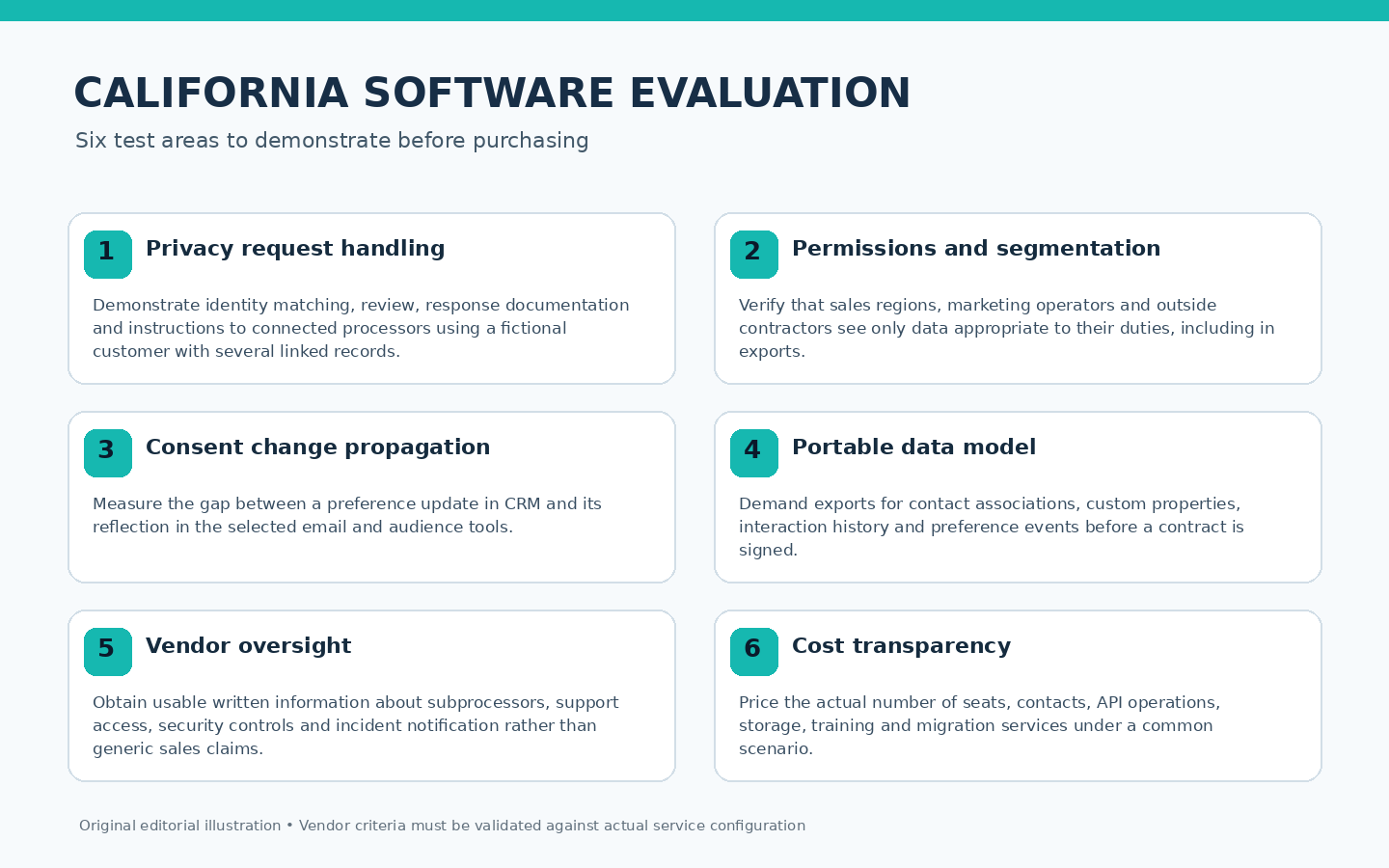
In California, evaluate California CRM privacy software with these six real-world trials and record vendor evidence.
1. Privacy request handling
Demonstrate identity matching, review, response documentation and instructions to connected processors using a fictional customer with several linked records. Set a documented California acceptance criterion for privacy request handling; preserve the supporting demonstration and its reviewer’s outstanding questions.
2. Permissions and segmentation
Verify that sales regions, marketing operators and outside contractors see only data appropriate to their duties, including in exports. Set a documented California acceptance criterion for permissions and segmentation; preserve the supporting demonstration and its reviewer’s outstanding questions.
3. Consent change propagation
Measure the gap between a preference update in CRM and its reflection in the selected email and audience tools. Set a documented California acceptance criterion for consent change propagation; preserve the supporting demonstration and its reviewer’s outstanding questions.
4. Portable data model
Demand exports for contact associations, custom properties, interaction history and preference events before a contract is signed. Set a documented California acceptance criterion for portable data model; preserve the supporting demonstration and its reviewer’s outstanding questions.
5. Vendor oversight
Obtain usable written information about subprocessors, support access, security controls and incident notification rather than generic sales claims. Set a documented California acceptance criterion for vendor oversight; preserve the supporting demonstration and its reviewer’s outstanding questions.
6. Cost transparency
Price the actual number of seats, contacts, API operations, storage, training and migration services under a common scenario. Set a documented California acceptance criterion for cost transparency; preserve the supporting demonstration and its reviewer’s outstanding questions.
A worked purchasing scenario
Consider a hypothetical 22-person California service firm replacing spreadsheets and two disconnected mail systems. Its pilot imports 900 fictional contacts, thirty duplicate identities and conflicting unsubscribe events. The selection team gives one salesperson regional access, one customer-care worker read-only access to account history and an administrator the ability to approve exports. On day four, a test user corrects an address and withdraws a marketing preference. The team observes what reaches the email tool, which job fails and whether the CRM records the outcome. A product that produces a polished dashboard but requires a week of manual reconciliation has failed the firm’s core requirement. That outcome is far more useful than ranking vendors by the number of advertised AI features.
How to organize the evaluation workshop
An implementation workshop should begin with a redacted spreadsheet describing the categories of information held by each department, not a copy of the production contact list. Sales supplies the opportunity fields it truly needs; service identifies the records it relies on for resolving complaints; marketing identifies every tool that receives audience data. Give the team an exercise in which two records refer to the same person but carry conflicting preferences. Decide which signal wins, how identity is verified and what happens to an automation already in progress. Write down exceptions rather than burying them in a ticket queue. Procurement should also request a small sample of the vendor’s standard contract and export format early, because legal and portability obstacles can invalidate a technically successful trial. Establish an internal monthly review of users, integration tokens and changing collection purposes. Finally, ask a business leader to explain the intended workflow without reading the vendor’s slide deck. If nobody can articulate who owns an individual request or a failed synchronization, the organization is not ready to deploy at scale.
Implementation, governance, and follow-up
A buyer can turn that plan into an acceptance register before a contract is signed. First, make the commercial owner name every required integration and the purpose of its data exchange. Next, have an administrator demonstrate a restricted role while somebody else observes the actual exported report. Third, log a fictitious correction request that arrives from a support agent instead of a website form. The record should show an assigned owner, a rational identity-verification step, the systems that must be checked and evidence of completion. Fourth, change a marketing preference and observe whether previously scheduled activity continues despite the change. Fifth, temporarily disable an API credential and assess what breaks and how the team learns about it. Sixth, obtain a complete export from the candidate vendor and ask another employee to reconstruct the basic customer history using only the file and a mapping guide. Seventh, compare the vendor’s documented retention statements to the operational settings a real administrator can view. Eighth, request a project plan for migration that includes time to resolve inconsistent consent records rather than assuming a flawless import. Ninth, calculate the cost of an additional sales team and a second marketing workspace at the relevant subscription tier. Tenth, document the unanswered legal or technical questions and their owners instead of scoring uncertainty as success. The final purchasing memo should include screenshots or written observations from each exercise, a clear cost model and a written choice about which data the company will stop collecting. That evidence is particularly useful when leadership is tempted to equate a famous brand name with an automatically privacy-ready installation.
A good launch checklist should also identify who will answer customer questions about data practices and how the business will correct an inconsistent record without erasing transaction evidence. Establish a separate staging environment for high-impact integration changes and keep an up-to-date inventory of service accounts. Do not promise that every request can be handled instantly: verification, exception analysis and legitimate retention can require careful work. The CRM should make those steps accountable rather than invisible.
Questions buyers frequently ask
Does a California company automatically need a special CRM?
No. The choice turns on the data handled, business practices, legal applicability and the controls a system can actually support. Evaluate obligations with counsel and test workflows rather than trusting a product label.
Is a consent checkbox enough for connected marketing tools?
Not by itself. You need consistent definitions, provenance, propagation rules, failed-job handling and periodic checks that external systems reflect current preferences.
Which evidence should a vendor provide before purchase?
Ask for a sample export, access-control demonstration, security and subprocessor documentation, a written scope of support, and a complete quotation for your expected configuration.
Further reading and source notes
Primary references for California California CRM privacy software. Obtain case-specific professional advice and independently verify service terms.